

iPhone · Android · Apple Watch · Wear OS
Every jump you land, measured on your wrist.
Spoteq records your session from your watch — height, air time, distance and speed for every jump — and puts it next to the forecast, the leaderboard and the riders you ride with.
Spoteq is being prepared for release on the App Store and Google Play. There is no public download link yet — write to us and we will tell you the moment there is.
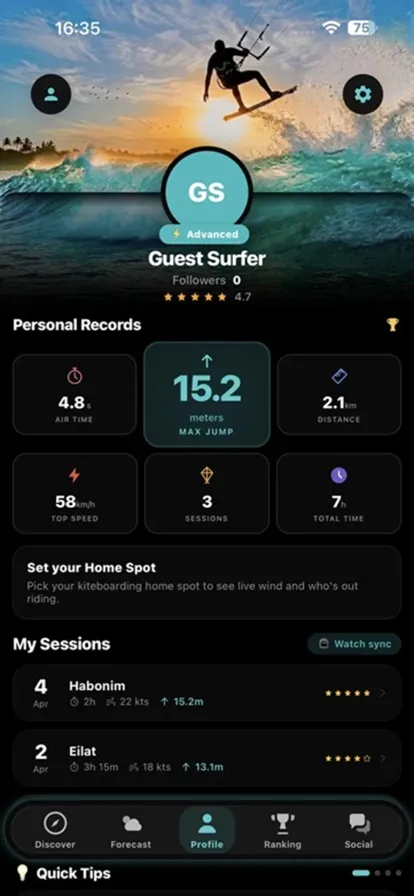
Inside the app
Real screens, not mockups
Captured from the app as it is today.
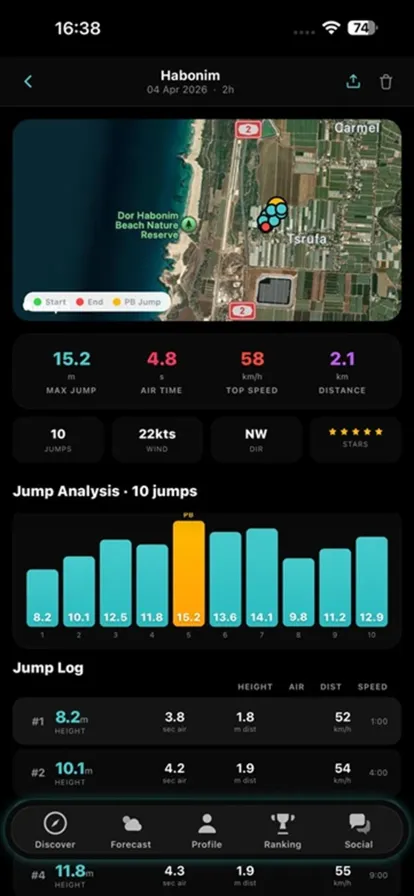
Every jump, logged
A session opens into its route on the map, a bar chart of every jump with the personal best marked, and a per-jump log of height, air time, distance and speed.
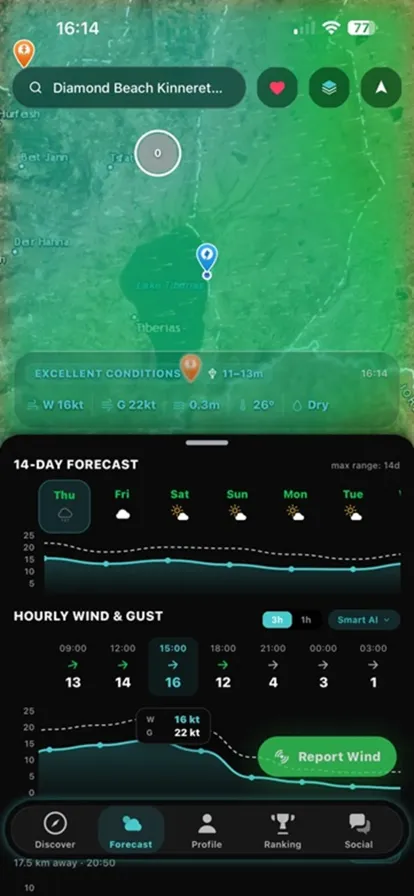
Wind before you drive
Wind and wave conditions on the map, a 14-day outlook and hour-by-hour wind and gust for the spot you are looking at.
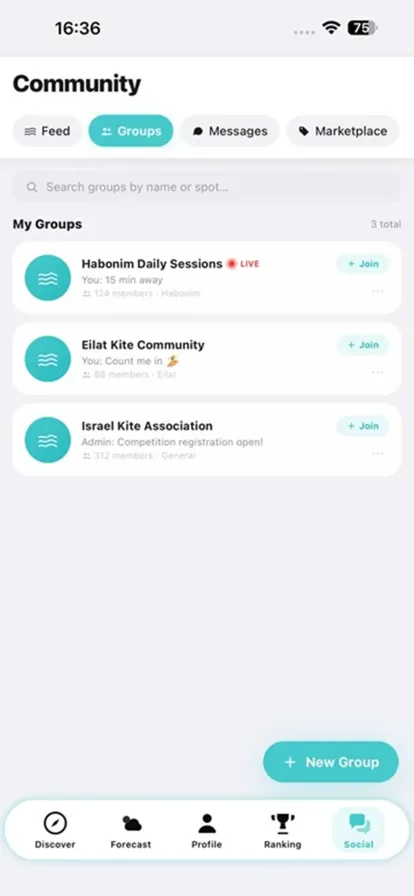
Your crew
Groups by spot or crew, with the live badge when someone is on the water. Direct messages are encrypted on your device.
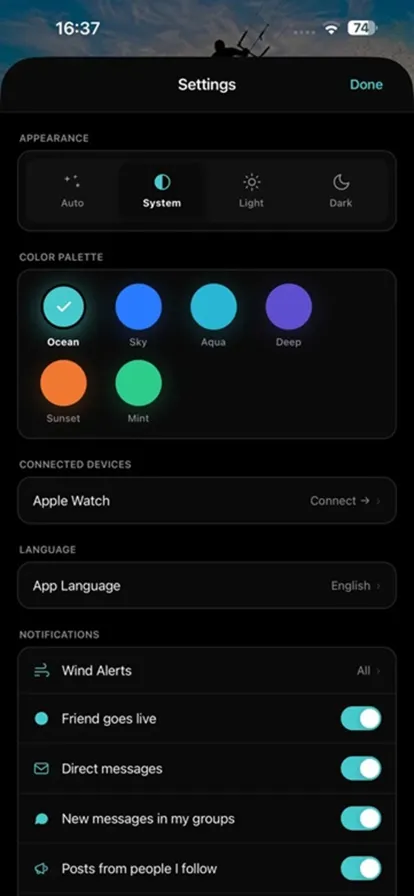
Made yours
Light, dark or system, six color palettes, 22 languages, and notifications you switch on one by one — including wind alerts.
Light or dark
The whole app follows your system appearance, and the palette you pick recolors every screen at once.
What it is
One app instead of four
Session tracker, forecast, group chat, gear market. Spoteq is all of them, connected by the same session data.
You ride
Start the session on your watch and put the phone down. The watch keeps recording on the water with no phone in range.
Spoteq measures
The jump engine on the watch brackets each take-off and landing from the motion sensors and reads the height off the barometer — height, air time, distance and speed per jump.
You get the session
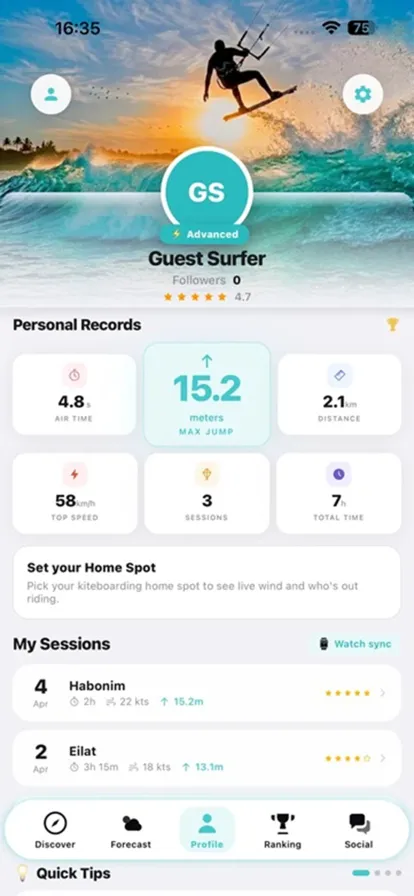
Route map, a chart of every jump, updated personal records, your place on the leaderboard and a card you can share to the feed.
How it works
From the water to your profile
Four steps. After the first one, none of them need you to do anything.
Install and sign in
Create an account with email, Google or Apple — or look around as a guest first.
Record on your wrist — or just your phone
Pair your Apple Watch or Wear OS watch (sign in there, or scan the QR code it shows) and start a session when you hit the water — the watch keeps recording with no phone in range. No watch yet? Tap Record on your phone instead: the same engine tracks the whole session — route, speed, distance and jumps.
Go live to your followers
When you start, your followers see you live on the map with your spot. Every new personal best alerts them the moment you land it.
Auto-sync at the end
When you finish, the full session and all its jumps appear on your profile: the route, the jump analysis, your updated records and your ranking.
Don't want to record a session? Spoteq still works for the forecast, the community, the marketplace and logging a session by hand.
Features
What is in the app
Six things, each built around what actually happens on a kite day.
Sessions and records
Every session is stored with its route, conditions and jumps, and rolls up into your personal records.
- Max jump, air time, distance, top speed, session count, total hours
- Route map, per-jump chart with the personal best marked, and a jump log
- A share card for the feed
Forecast and live wind
Wind and wave forecasts for your spots, plus what riders are reporting right now.
- Up to 14 days, hourly wind and gust
- Live readings from nearby wind stations
- Riders you follow, live on the map — each one with the jump chip that lights up the moment they land a new best
- Rider wind reports — strong ones alert riders near the spot
- Wind alerts you configure per spot
- Around 2,600 kite spots from OpenStreetMap, plus your own custom spots
Rankings
See where you stand — at your home spot, in your country, or globally.
- Daily, weekly, monthly and all-time boards
- Spot, country and global scopes
- A live row of riders currently on the water
Community
The people you ride with, in the app instead of scattered across group chats.
- Feed with posts, photos and stories, updating in real time
- Group chats by spot or crew
- Direct messages, encrypted on your device
- Follow riders, clubs and brands
Gear marketplace
Buy and sell kites, boards, harnesses, foils and bars with riders near you.
- Listings with photos, condition, price and location
- Filter by category, save what you are watching
- Listed by riders on the platform, surfaced by proximity
SPOTEQ PRO
A personal coach and a cinematic replay of your jumps — free for now, while Spoteq is in pilot.
- SPOTEQ Coach: a step-by-step path from your first water start to your best jump, with tips read off your own sessions
- Cinematic 3D replay — the camera rides every jump with you, not just a chart of it
- Deeper session analysis and the Smart AI forecast model
- Free while Spoteq is in pilot — no payment details, no charge
Who it is for
Riders, clubs and brands
Three roles, three different reasons to be here.
Riders
Anyone who wants to know how high they actually went, and who else is out.
- Sessions recorded from the watch, no phone on the water
- Personal records and leaderboards
- Forecast, wind alerts and live conditions
- Feed, groups and encrypted messages
Clubs and schools
A page riders follow, with the conditions and what is happening at the beach.
- Live conditions on your club page
- Info: description, address, hours, phone, website
- Events with dates and spots left
- Posts to your followers and a shop tab
Brands and importers
Presence where riders already are, typed clearly as a brand rather than a club.
- Brand page with your own posts and products
- Followers, so news reaches riders directly
- Discoverable alongside clubs and schools
Privacy and safety
What we do with your data
Only what is actually implemented — the details are in the Privacy Policy.
Private messages are encrypted
Direct messages are encrypted on your device, and other users cannot read them. Group chats are not encrypted — a group is a room you share with other people.
Photos, videos and text are screened before they are public
Uploaded photos and videos are automatically checked for objectionable content before they become visible, and stay private if the check cannot complete — nothing publishes by default. Text you post is checked for prohibited content before it goes live too.
Report and block, always available
Any post, comment, story, listing, profile or message can be reported, and any user can be blocked. We act on valid reports as fast as we can — we have not set a published response time, so we do not claim one.
You can delete your account yourself
Delete it from Settings → Account. We email a 6-digit code first to confirm it is you. The account is deactivated immediately and its records are deleted after a 30-day grace period you can cancel. Uploaded media files are not yet removed by that process — the Privacy Policy says exactly what is and is not erased.
You choose what is on
Location, notifications and wind alerts are permissions and switches you control, and you can revoke them at any time.
Data is encrypted in transit. We do not sell personal data. Spoteq uses service providers to operate — hosting and database, weather data, push notifications, content moderation and sign-in with Google or Apple; they are all listed in the Privacy Policy.
FAQ
Questions we get
If yours is not here, write to us — the address is at the bottom of the page.
What do I need to use Spoteq?
The Spoteq app on an iPhone or Android phone, and an account. For sessions recorded on the water you also want the Spoteq app on an Apple Watch or a Wear OS watch — that is what measures your jumps.
Can I use it without a watch?
Yes. The forecast, rankings, feed, groups, messages, marketplace and club pages all work from the phone, and you can look around as a guest before creating an account. Automatic session recording and jump measurement need the watch.
How do you measure jump height?
The watch runs a jump-detection engine that combines the motion sensors and the barometer: the motion sensors mark the exact take-off and landing, and the pressure change between them gives the height. Height, air time, distance and speed are worked out on the wrist while you ride and refined a few seconds later.
How do I connect my watch?
Install Spoteq on the watch and sign in with the same account. If you prefer, open Connect on the watch and scan the QR code it shows with your phone — that links the watch to your account without typing a password on a small screen.
Where does the forecast come from?
Forecasts use weather data by Open-Meteo.com (CC BY 4.0). Riders can also post live wind reports from the beach. Sources and licences are listed in the app under Settings → Data Sources.
Are my messages private?
Direct messages are encrypted on your device and stored encrypted, so other users cannot read them. Group chats are not encrypted: a group is a shared room, so encryption there would only protect against us, not against the other people in the room.
How is objectionable content handled?
Uploaded images are automatically screened before they become publicly visible, and if the check cannot complete the content stays hidden. Anything in the app can be reported and any user can be blocked. Our Terms state a zero-tolerance policy. We act on valid reports as fast as we can, but we have not published a response-time commitment and do not claim one.
How do I delete my account?
In the app: Settings → Account → Delete Account. We email a 6-digit code to confirm it is you. The account is deactivated straight away and its records are deleted after 30 days — you can sign in and cancel during that window. Media files you uploaded are not yet removed by that process; the Privacy Policy sets out exactly what is and is not erased.
Which languages does the app support?
22, including Hebrew and Arabic with full right-to-left layout. The app follows your device language and you can override it in Settings.
Is there a web version?
No. Spoteq is a mobile app with a watch companion; this website is here for information, legal documents, support and account requests.
Pilot
Ride with us early
Spoteq is being prepared for release on the App Store and Google Play. Leave your details and we will get in touch when the pilot opens on your platform.